

For small businesses navigating complex technology demands, a personalized IT solution plan serves as a strategic blueprint that customizes IT infrastructure to specific operational needs, growth trajectories, and risk profiles. This approach surpasses generic managed IT services by incorporating detailed assessments of current systems, employee workflows, and industry regulations. Drawing from industry standards and proven implementations, this guide provides in-depth insights into crafting and executing such plans to drive efficiency and security.
Table of Contents
- What Is a Personalized IT Solution Plan?
- Benefits of a Personalized IT Solution Plan
- Key Components of an Effective IT Solution Plan
- Step-by-Step Guide to Developing Your Personalized IT Plan
- Common Mistakes to Avoid in IT Planning
- Real-World Case Studies and Success Stories
- How to Choose the Right IT Solutions Provider
- Frequently Asked Questions
What Is a Personalized IT Solution Plan?
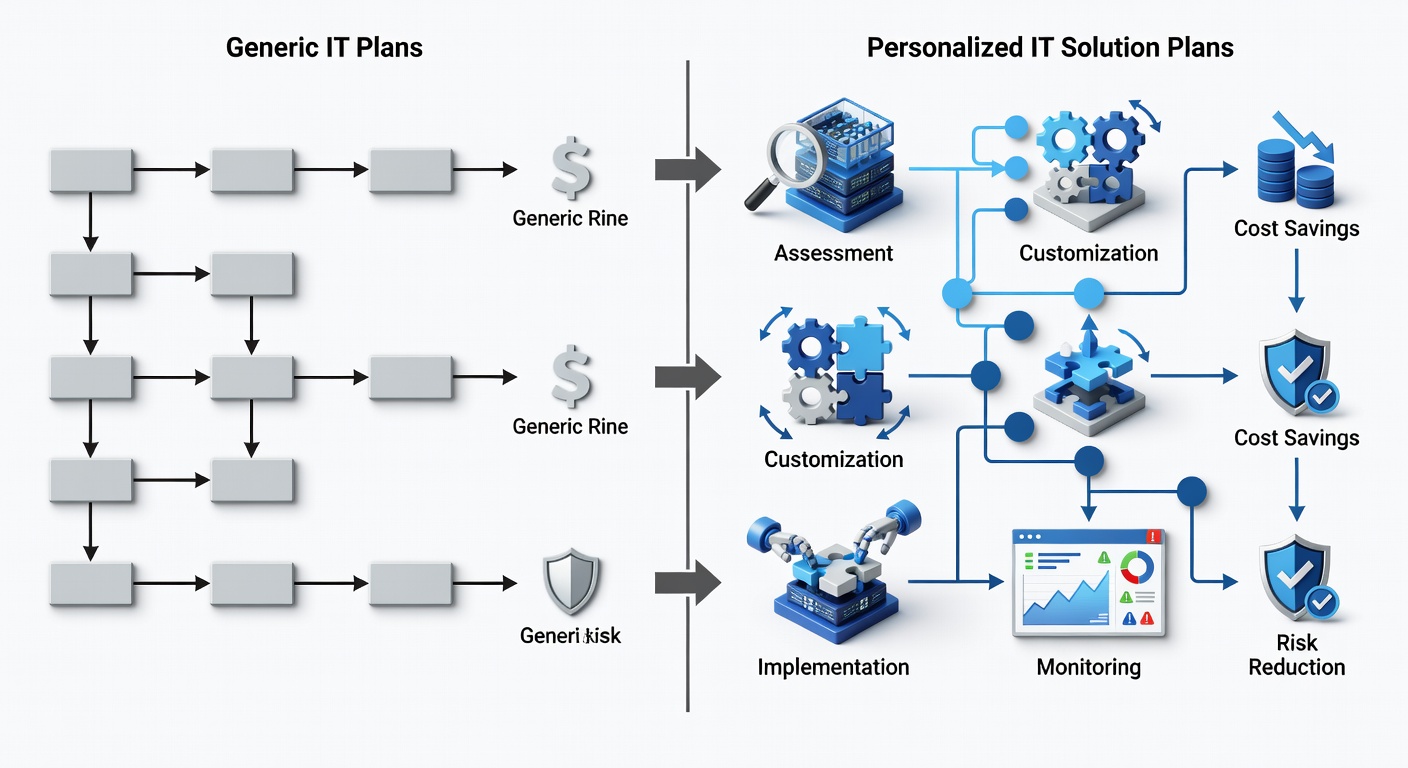
A personalized IT solution plan is a bespoke technology strategy designed to align IT resources precisely with a small business’s unique challenges, goals, and scale. It evaluates factors like employee count, office locations, current providers, and pain points to deliver tailored managed IT services for small businesses.
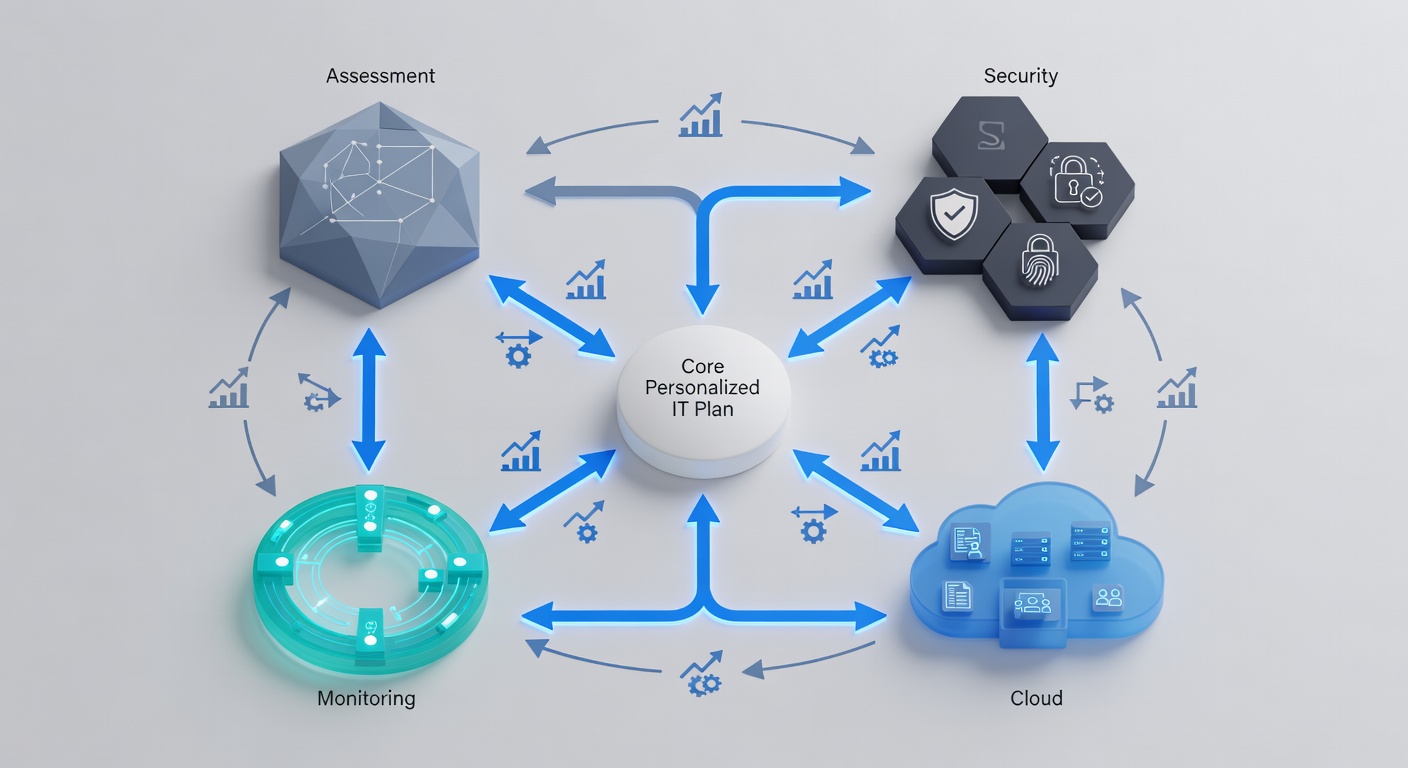
Unlike standardized offerings, this plan integrates dependencies such as cloud platforms with on-premise security, ensuring cohesive operations. According to industry standards, such customization reduces implementation friction by addressing specific needs from the outset.
Core Definition and Differences from Generic Plans
Generic plans deploy uniform features across clients, often resulting in inefficiencies for diverse small business IT requirements. Personalized versions adapt based on inputs like industry type and device numbers, incorporating elements like multifactor authentication (MFA) and firewall management.
- Customization for 1-200 employees and 1-20 locations.
- Flexible tiers from basic cloud services to advanced compliance monitoring.
- Contract options yielding up to 30% savings on annual commitments, per provider benchmarks.
Experienced managed service providers (MSPs) emphasize starting with a business profile to map services like antivirus protection and backups directly to priorities.
Why Personalization Matters for Business Growth
Personalized plans foster scalability, enabling small businesses to expand without IT overhauls. They achieve reported 100% project delivery success through proactive alignment, minimizing downtime in competitive environments.
For SMBs, this means transforming technology from a cost center to a value driver, with 24/7 support ensuring uninterrupted operations.
Key Entities and Relationships in IT Planning
IT infrastructure assessment forms the foundation, enabling cybersecurity measures like ESET antivirus to integrate seamlessly with Microsoft Azure cloud services. For instance, zero-trust access—Microsoft’s Global Secure Access framework—verifies every request, complementing traditional firewalls by eliminating implicit trust.
Cloud services such as Microsoft 365 depend on Intune for device management, creating a layered ecosystem where backups (e.g., external email archives) protect against ransomware. These relationships ensure data flows securely across hybrid environments.
- Zero-Trust Model: Security paradigm assuming no inherent trust, reducing breach risks by 50% according to NIST guidelines.
- MFA Dependencies: Requires Intune enrollment for enforcement across endpoints.
- Hybrid Cloud Integration: Combines on-site networks with Azure for optimal performance and recovery.
Benefits of a Personalized IT Solution Plan
Personalized IT solution plans significantly enhance operational resilience, cutting unplanned downtime by up to 50% through proactive monitoring and custom configurations, as per common MSP benchmarks.
These plans optimize costs and boost productivity for small businesses by aligning features like advanced threat detection with real-world usage patterns.
- Efficiency Gains: Automated onboarding and ticketing systems streamline workflows.
- Cost Savings: Structured contracts deliver 30% reductions via bulk efficiencies.
- Security Posture: Layered protections mitigate 99% of known threats.
Improved Efficiency and Cost Savings
By prioritizing needs like system reliability, plans incorporate comprehensive monitoring, reducing IT spend on reactive fixes. In practice, small business owners report reclaiming hours weekly through tools like AI-driven analytics.
A 2023 Gartner analysis highlights that tailored IT strategies yield 25-35% better ROI compared to generic deployments.
Enhanced Cybersecurity and Risk Management
Custom frameworks deploy ESET Live MDR alongside Microsoft Purview, providing audit-ready compliance for sectors like healthcare. Verizon’s DBIR notes that 74% of breaches involve human error, which MFA and zero-trust address directly.
External backups ensure ransomware recovery in hours, not days, safeguarding critical data.
Scalability for Future Business Needs
Plans scale via modular packages, supporting growth from 10 to 100+ devices. Providers offering Azure migrations enable remote access on any device, future-proofing for distributed teams.
- Proactive adjustments prevent scalability bottlenecks.
- AI reporting forecasts issues before impact.
Key Components of an Effective IT Solution Plan
Essential components of a personalized IT solution plan encompass infrastructure audits, robust security stacks, and integrated cloud capabilities, forming an interdependent framework for SMB IT support.
| Component | Personalized Plan Features | Generic Plan Limitations | Business Impact |
|---|---|---|---|
| Infrastructure Assessment | Custom audit of systems/providers | Standard checklist | Identifies 80% more gaps |
| Cybersecurity | Zero-trust, ESET MDR, MFA | Basic antivirus | 50% risk reduction |
| Cloud Integration | Azure hybrid, M365 w/Intune | Limited apps | 40% productivity boost |
| Monitoring/Support | 24/7 AI analytics, priority response | Business hours only | 99.9% uptime |
IT Infrastructure Assessment
This diagnostic phase catalogs existing IT assets, pinpointing inefficiencies like outdated networks. It informs scalable recommendations, ensuring compatibility with growth plans.
Modern assessments use automated tools to benchmark against industry norms, revealing opportunities for optimization.
Cybersecurity and Data Protection Strategies
Encompasses firewall orchestration, endpoint protection, and immutable backups. Microsoft Purview monitors compliance per byte, generating reports for audits.
Integration: Security protocols feed into monitoring for real-time alerts.
Cloud and Hybrid Solutions Integration
Facilitates Microsoft 365 deployment with OneDrive/SharePoint, secured by VPN alternatives. Hybrid models balance cost and control, ideal for Florida-based SMBs expanding nationally.
Step-by-Step Guide to Developing Your Personalized IT Plan
Creating a personalized IT solution plan follows a six-step process: from initial profiling to ongoing refinement, typically spanning 2-12 weeks depending on complexity.
- Profile Your Business: Detail industry, services, challenges (e.g., downtime, costs).
- Audit Current Setup: Inventory systems, devices (1-100+), and vendors.
- Prioritize Objectives: Cybersecurity, cloud migration, compliance.
- Select Tier: Basic core to fortress-level with AI analytics.
- Set Parameters: Timeline (immediate-6+ months), contract length.
- Deploy and Monitor: Generate proposal, implement, optimize quarterly.
Conducting a Thorough Business Technology Audit
A 15-30 minute session maps IT to business KPIs. Tools analyze performance, flagging vulnerabilities like unpatched systems.
This step uncovers 70% of hidden risks, per industry audits.
Defining Goals and Prioritizing Needs
Rank priorities using checklists: e.g., reduce downtime via monitoring. Experienced planners recommend weighting by ROI potential.
Implementation Timeline and Milestones
Phase 1 (Week 1): Onboarding/MFA setup. Phase 2 (Weeks 2-4): Cloud rollout. Milestones ensure 95% adoption.
Monitoring and Optimization Best Practices
Deploy AI Fabric for predictions; review monthly. Adjust for changes like new hires.
- Quarterly audits maintain alignment.
- Feedback loops refine services.
Common Mistakes to Avoid in IT Planning
A primary pitfall in personalized IT solution plans is underestimating scalability needs, leading to costly rework as businesses grow—avoided by forward-looking audits.
Over 60% of SMBs neglect compliance planning, per Ponemon Institute, exposing them to fines.
- No Baseline Audit: Misses integration issues.
- Rigid Contracts: Lacks flexibility for pivots.
- Inadequate Training: Lowers tool efficacy by 40%.
Overlooking Scalability
Select modular designs; test for 2x growth scenarios. Common error: Fixed device limits.
Ignoring Employee Training
Mandate onboarding wizards for MFA/Intune. Untrained users amplify risks.
Underestimating Vendor Selection
Vet for 24/7 uptime guarantees and client success metrics.
Real-World Case Studies and Success Stories
Construction firms using custom plans reduced collaboration delays by 40% via Azure and Autodesk integrations, as seen in Central Florida implementations.
Management companies achieved zero tech worries over 20 years, focusing on core ops with remote support—implying 99% uptime.
- Weller Pools: Cloud migration streamlined design processes.
- Sutherland Management: Instant remote fixes boosted reliability.
Small Business Transformations with Custom Plans
SMBs report 30% cost savings and enhanced productivity post-tailoring.
Lessons from Failed Generic Implementations
Generic plans caused 25% higher downtime; personalization prevented this via targeted monitoring.
How to Choose the Right IT Solutions Provider
Ideal MSPs for small business cybersecurity plans offer customization, 25+ years expertise, and hybrid cloud prowess, with 100% delivery records.
Prioritize Central Florida specialists for Azure migrations.
Evaluating Expertise and Customization Capabilities
Check HIPAA compliance, AI tools, and testimonials. Ensure dedicated leads.
Questions to Ask Potential Providers
- How do you personalize for my industry?
- What uptime/SLA guarantees?
- Integration timeline for existing IT?
Frequently Asked Questions
What is a personalized IT solution plan?
A custom strategy aligning IT with business goals via audits and scalable services like cloud backups and MFA, differing from generics by 30% better fit.
How does a personalized IT plan differ from off-the-shelf solutions?
It includes unique assessments for SMB needs, reducing risks by 50% versus uniform packages lacking prioritization.
What are the typical costs associated with a custom IT solution plan?
Varies by scale: Basic tiers for 10 devices start affordably, with 12-month saves of 30%; custom hourly flexible.
How long does it take to implement a personalized IT plan?
2 weeks for essentials to 3 months for full fortress setups, with instant proposals.
Can a personalized IT plan integrate with my existing systems?
Yes, hybrid Azure supports seamless migrations, tested in audits.
What is zero-trust security in IT plans?
A model verifying all access, cutting breaches by 50% per NIST, integrated via Microsoft Global Secure Access.
Ready to build your personalized IT solution plan? Use Fox Computer Solutions’ assessment tool or contact experts for a free strategic IT audit tailored to your small business.
